What should I do if the system log shows “Can not find any account for the incoming call” for TP-Link ISP-customized DSL Modem Router?
Introduction
This article provides instructions to prevent the system log message ”Cannot find any account for the incoming call’ from appearing.
Requirements
- TP-Link ISP-Customized DSL router
- Phone/Computer for logging into the router's web UI
Configuration
Step 1. Log in to the web management interface.
Step 2. Go to Advanced > Telephony > Telephone Number > Advanced Settings > Advanced. Enable Only Accept Sip From Proxy function. Then click Save.
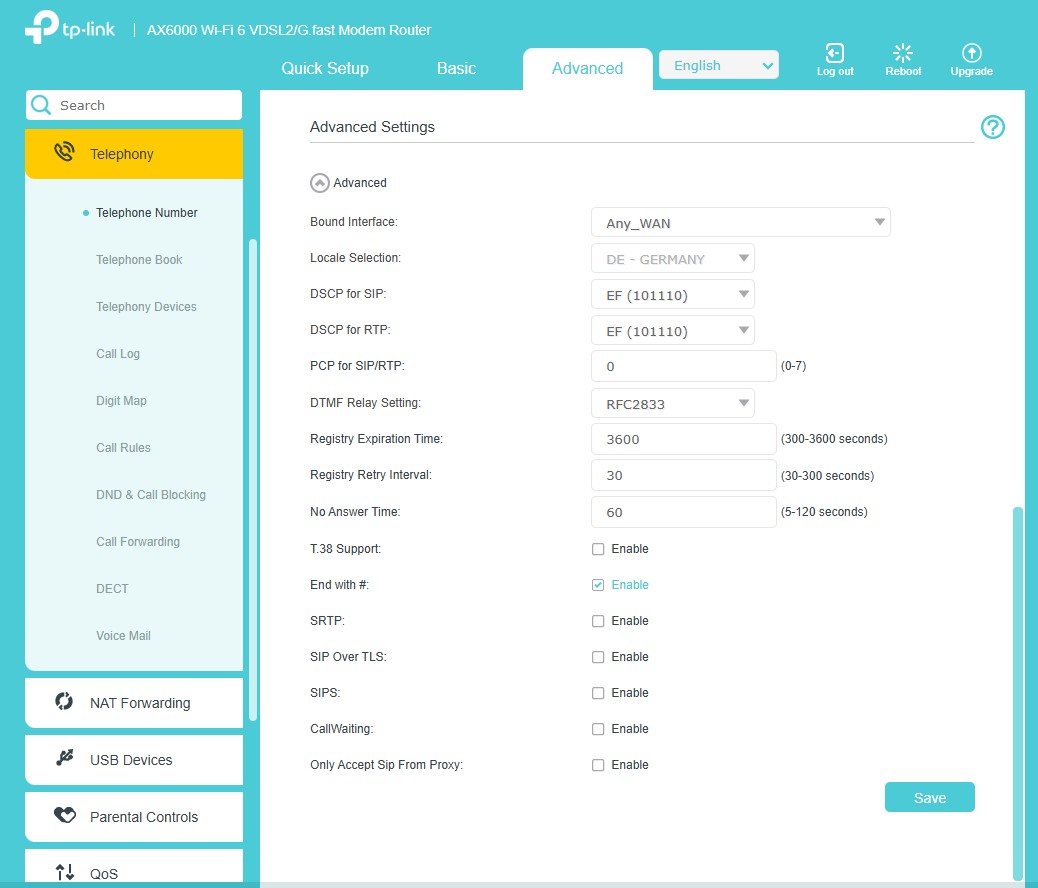
Step 3. Go to Advanced > System > System Log to confirm that “Can not find any account for the incoming call” does not appear.
QA
Q1: What should I do when enabling the ‘Only Accept SIP From Proxy’ feature causes VoIP registration to fail?
A1: When this feature is enabled, only specific SIP addresses are allowed to reach the router. If your VoIP provider uses multiple SIP addresses, this may cause VoIP registration failures. If this issue occurs, please disable the Only Accept SIP From Proxy feature.
Get to know more details of each function and configuration please go to Download Center to download the manual of your product.
